Appearance
Search Indexing & Reindexing
Open Archiver stores every archived email in two places: the database and file storage are the source of truth, while Meilisearch holds a secondary, full-text search index. When you search, you are querying Meilisearch. If a message is in the archive but missing from the index, it will not appear in search results until it is (re)indexed.
This guide explains how indexing stays reliable, how to see index coverage, and how to repair gaps.
How indexing works
- When emails are ingested (initial import or continuous sync), they are written to the archive and then queued for indexing on the
indexingjob queue. - Each batch is only marked as indexed after Meilisearch confirms the write succeeded. If Meilisearch rejects or drops a batch, the job fails and is retried automatically — it is never silently reported as done.
- Because the index is a secondary store, it can always be rebuilt from the archive. Rebuilding is safe and idempotent: Meilisearch documents are keyed by the email ID, so re-indexing an email updates its document rather than creating a duplicate.
Index health
Every ingestion source shows an index-health figure — "X of Y emails indexed" — comparing the number of archived emails (database) against the number of documents in the search index (Meilisearch). You can see it:
- On the Ingestion Sources list (in the status hover card).
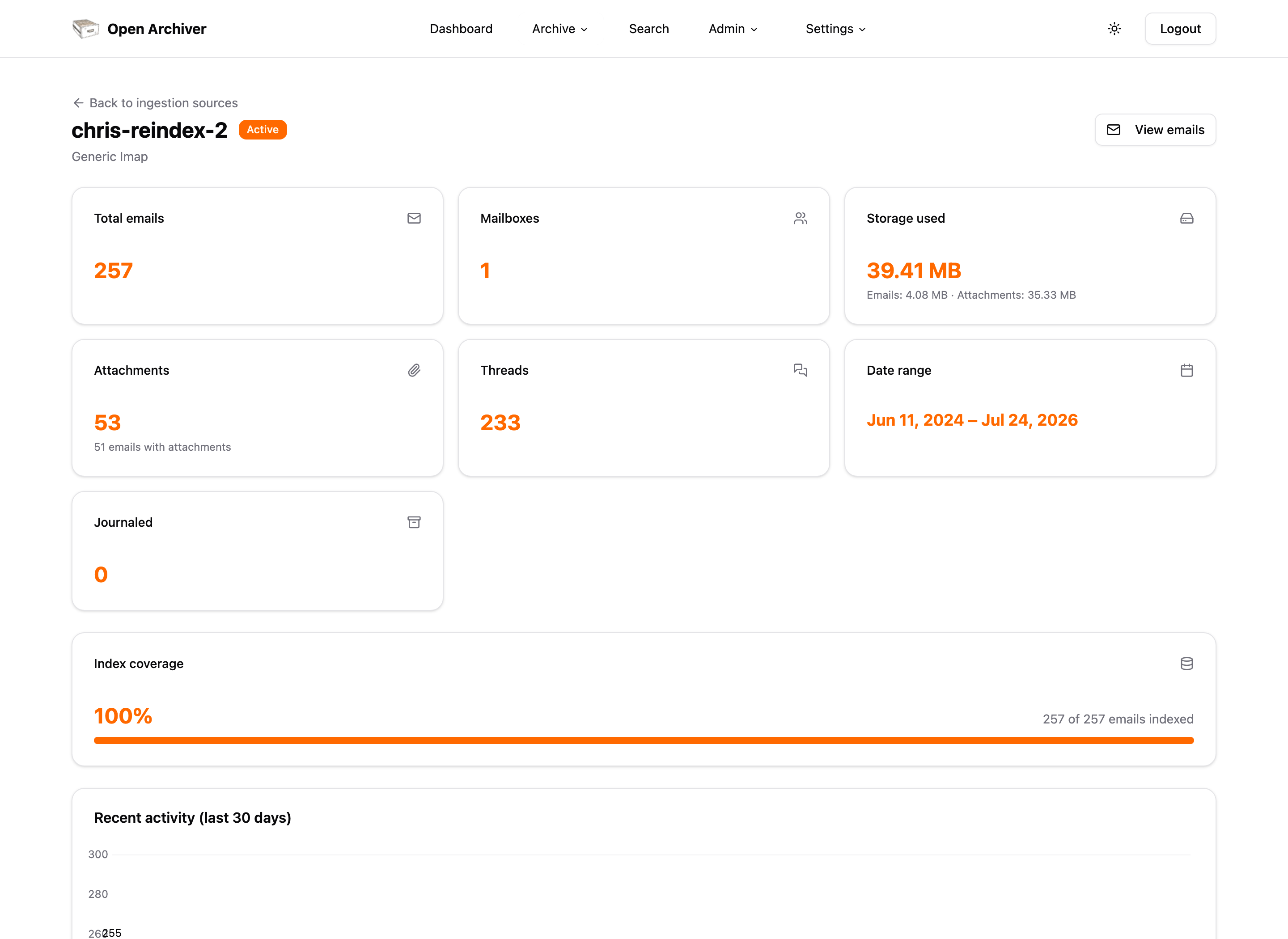
- On a source's Statistics page (see below), as an index-coverage bar.
- Globally on the dashboard via the index-health endpoint.
A gap between the two numbers means some emails are missing from search and should be reindexed.
Automatic self-healing
A background reconcile job runs on a schedule and re-queues any emails that are archived but not yet in the index, so transient failures heal on their own without any action. It is safe to leave on and is designed to stay cheap even with millions of emails.
It is controlled by environment variables:
| Variable | Default | Purpose |
|---|---|---|
INDEX_RECONCILE_ENABLED | true | Enable/disable the periodic reconcile job. |
INDEX_RECONCILE_CRON | */30 * * * * | How often reconcile runs (cron pattern). |
INDEX_RECONCILE_PAGE_CAP | 20 | Max batches enqueued per run, so a large backlog drains over several runs. |
INDEX_RECONCILE_BACKPRESSURE | 100 | If the indexing queue already has this many jobs, the run defers. |
MAX_INDEX_ATTEMPTS | 5 | Stop retrying an email after this many failed indexing attempts (prevents a single bad email from looping forever). |
MEILI_WAIT_FOR_TASK_TIMEOUT | 300000 | Milliseconds to wait for a Meilisearch task before treating the batch as failed. |
Looking for search filters?
How to search the archive — keywords, advanced filters, date ranges, field-scoped search — is covered in Searching the Archive. Two things depend on this page and need a one-time reindex for mail archived on older versions: the with/without attachments filter (older mail is counted as "without attachments" until reindexed), and resolved sender names in search results (older mail shows the raw sender address instead of the display name until reindexed).
Looking for search filters?
How to actually search the archive — keywords, advanced filters, date ranges, field-scoped search — is covered in Searching the Archive. One filter depends on this page: the with/without attachments filter needs a one-time reindex before emails archived on older versions are counted as "with attachments".
Reindexing
Reindexing rebuilds search documents from the archive. It never re-downloads mail and never duplicates data. There are two modes:
- Missing (default) — only (re)indexes emails that are not currently in the index. Cheap; use this to fill gaps.
- Full — resets and rebuilds every document for the selected scope. Use this after a search-schema change, or when you suspect the index is stale even though emails appear "indexed".
Reindex a single source
On the Ingestion Sources page, open a source's actions menu and choose Reindex. This reindexes the source and its entire merge group (missing mode). For a full rebuild of one source, call the API with {"mode": "full"} — see Reindex an Ingestion Source.
Reindex everything
Use the Reindex All button at the top of the Ingestion Sources page and pick Reindex missing or Full rebuild. This covers every source. See Reindex All Sources.
Upgrading from an older version
On upgrade, existing emails are marked as indexed to avoid re-indexing the whole archive automatically. If the index-health figure shows a genuine gap for older data, run a Full rebuild (or a per-source full reindex) once to bring the index up to date. A Full rebuild is also what backfills newer search fields for existing mail — for example the with/without attachments filter and resolved sender names in results, both added in v0.5.2.
Watching progress
Reindexing enqueues batches onto the indexing queue. You can watch them drain in Admin → Jobs (the indexing queue), and the index-health figure will climb as batches complete. If jobs pile up in waiting and never move, make sure the indexing worker process is running.
Per-source statistics
Each ingestion source has a View statistics action (in the row menu) that opens a read-only page with total emails, mailboxes, storage usage (email + attachment), attachments, threads, date range, index coverage, a per-mailbox breakdown, merge-group children, and a recent-activity chart. See the statistics endpoint.
Search-index administration
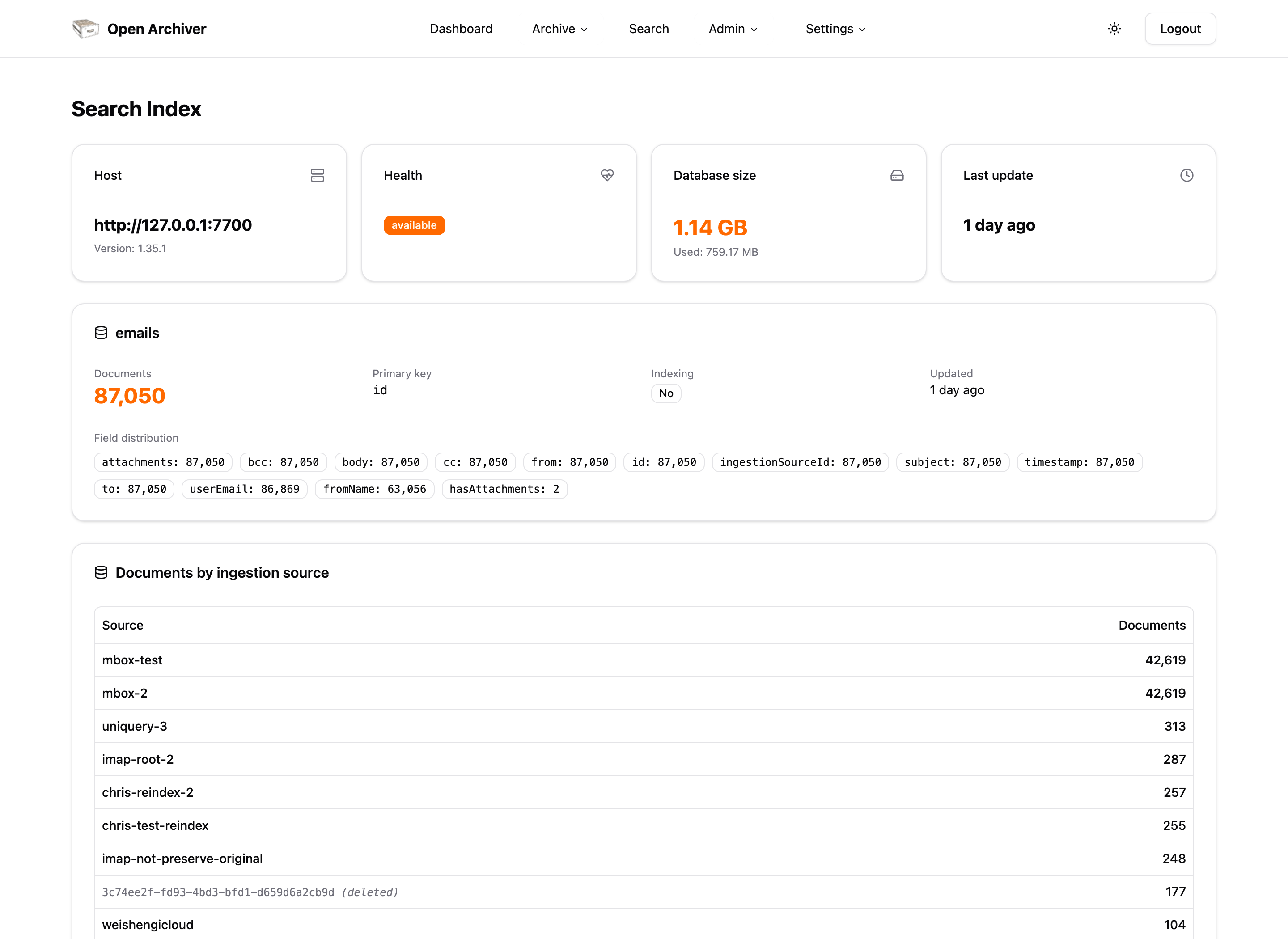
For deeper troubleshooting, Admin → Index (Super Administrator only) mirrors the essential parts of the Meilisearch dashboard directly inside Open Archiver:
- Instance overview — host, version, health, and database size.
- Index metadata — document count, primary key, indexing state, and field distribution for the
emailsindex. - Documents by ingestion source — per-source document counts taken straight from the search index (not the database), which is the quickest way to spot which source is under-indexed.
- Tasks — the Meilisearch task list (additions, settings updates, etc.) with status, received/indexed document counts, duration, timestamps, and error details for failed tasks, plus status filtering and pagination.
These screens are backed by the read-only Index Admin API.